

Need to send one file, so why should either person have to make an account? You can send files without an account, but skipping sign-up doesn’t mean skipping the basics. Check how the recipient gets access, whether they need an app, and how long the file will be available.
A straightforward transfer has a few steps: choose the file, share the access details, and let the recipient open or download it. Links and codes work differently, though, and “no account” doesn’t automatically mean anonymous or tell you how long a file stays available.
This guide explains how account-free sharing works and what to check before you send. You’ll learn what the recipient needs, how to think about access and privacy, and when a code-based transfer makes sense. WMES File Send uses a short code to connect sender and recipient in a browser, with no account or software installation required. It works on computers, phones, and tablets. That makes it a practical way to skip sign-up while keeping the important checks in view.
Key Takeaways
- To send files without an account, focus on how the recipient gets access, not just whether sign-up is required.
- No registration doesn’t mean anonymous use or zero data collection. Check what the service says about privacy and file handling.
- Compare links, email delivery, and short codes by the steps each requires from you and the recipient.
- Before sending, consider file sensitivity and expected availability. Share access details only with the intended recipient.
- WMES File Send uses browser-based, code-based access, so both people can connect without creating accounts or installing software.
What Does It Mean to Send Files Without an Account?
To send files without an account means you and the recipient can use a file-transfer service without creating profiles or signing in. That removes registration from the process, but you still need to prepare the file, give the recipient a way to access it, and understand how the service handles information.
Account-free sharing describes the sign-up requirement, not who can access a file or what data a service collects. The recipient may still need a link, email, or code from you. The service may also process information needed to operate the transfer. Those details depend on the method and service.
That distinction helps you choose a method for the task. If you’re sending a document once to someone who doesn’t use the same service, account creation can add steps without helping either person. A browser-based option can also avoid an app installation. WMES File Send, for example, connects sender and recipient with a short code in a browser, on desktop computers, phones, and tablets. WMES says it stores only the minimum information needed to operate. That statement isn’t a claim of anonymity or a security guarantee.
File transfers can use different technical approaches. The general overview of file transfer protocols provides context, but the practical question is simpler: what must each person do to move this file from sender to recipient?
Which steps disappear when nobody needs an account?
Without registration, you skip steps such as creating a username, setting a password, or signing in. The transfer itself still needs a few actions: prepare a file, create or receive access details, share them, and open the file. The recipient needs the access method you provide. A link must reach them, an email must go to the right address, or a code must be shared with them.
The exact steps vary. With a link, you may copy an address into a message. Email delivery may ask you to enter the recipient’s address. A code-based method may ask both people to use matching access details in a browser. “No account” doesn’t mean “no instructions.” It means the transfer can happen without setting up a service account.
Does account-free sharing mean anonymous or private?
No sign-up is not the same as anonymity. A service may still process operational information to run a transfer, and access controls and data practices can differ between services. Don’t assume that a file is private, encrypted, or deleted just because neither person registered.
Before sending sensitive material, check how access works and what the service says about data handling and file availability. Then share the access details only with the intended recipient. Fewer steps make a one-time transfer easier, but they don’t answer every privacy question.
How Do Account-Free File Transfers Work?
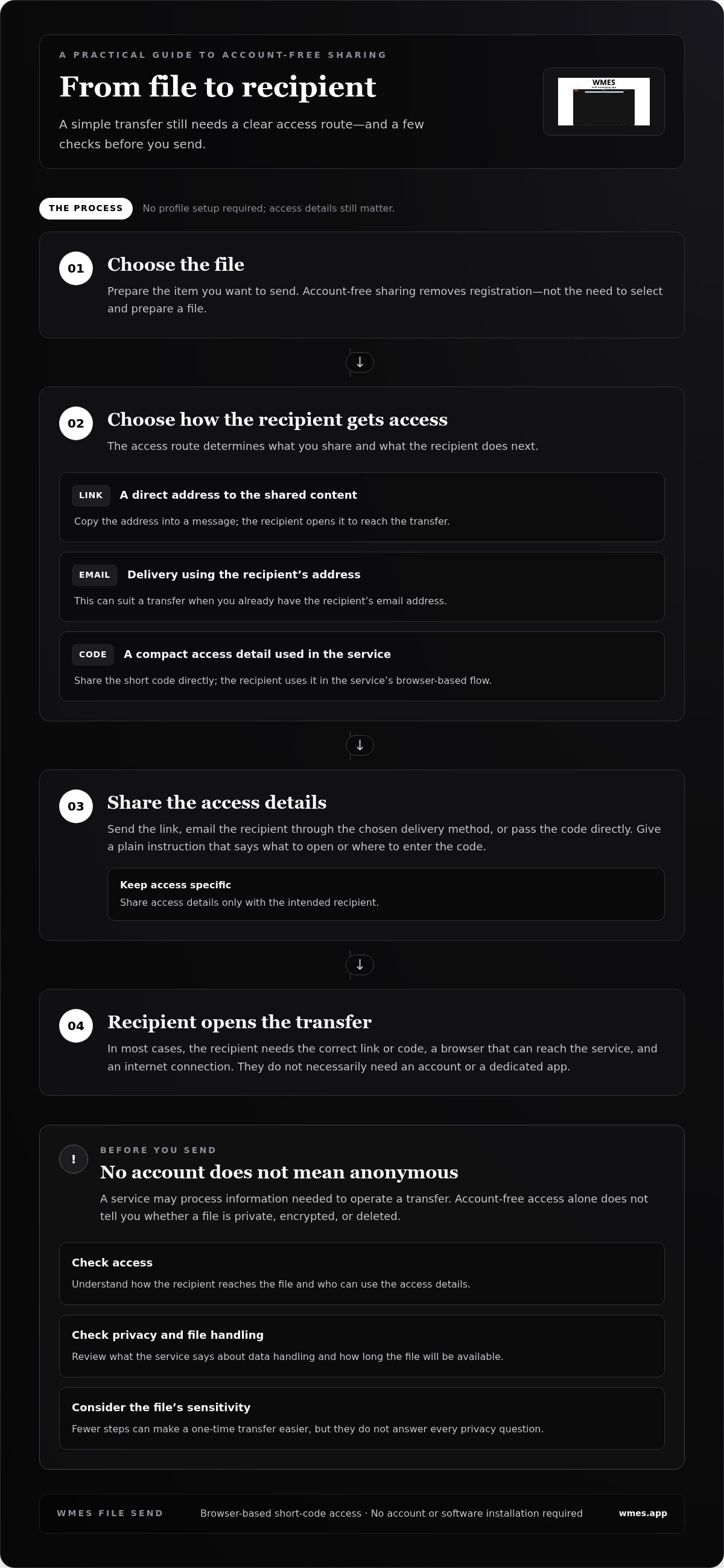
An account-free transfer follows a simple path: choose a file, create a way to access it, share that access with the recipient, and let them open the transfer. The service handles the connection between those steps. You don’t need to set up a profile first, but the recipient still needs the correct access details.
Access details connect a recipient to a shared transfer. They might be a web address the recipient can open directly or a short code they enter in a browser. Both methods provide a way to reach the file, but they give you different options for sharing access.
- With a link: Share the address through a message or another channel. The recipient opens it to reach the shared content.
- With a code: Send the short access detail directly. The recipient uses it in the service’s browser-based flow to connect to the transfer.
For a one-time send, the useful question isn’t which method sounds simplest in general. Consider which one your recipient can follow without extra explanation and how you can share the access details with them directly.
What is the difference between a file link and a short code?
Both give the recipient a route to shared content. A link works like a direct address: open it to reach the transfer. A short code is a compact piece of access information that the recipient uses within the service instead of opening a full address. WMES File Send uses a short code to connect sender and recipient through a browser, without account creation or software installation.
What does the recipient need to open a shared file?
In most cases, the recipient needs the correct link or code, a browser that can reach the service, and an internet connection. They don’t necessarily need an account or a dedicated app. The exact experience depends on the method and service, so make your instructions plain and specific.
For example, say whether the recipient should open a link or enter a code, and where to use it. Sending a code without explaining what to do with it can leave them unsure where to start. If you share a link, make clear that it’s the access point for the file. A short instruction can prevent a round of “Where do I put this?” replies.
WMES File Send uses browser-based code access on desktop computers, phones, and tablets. If that approach fits your transfer, you can send a file with WMES File Send without asking the recipient to install software or create an account.
Link, Email, or Code: Which No-Account Method Fits?
The best fit depends on what the recipient already uses and how you plan to pass along access. A link is easy to paste into a message. Email delivery can work well when you already have the recipient’s address. A short code gives both people a compact access detail to use in a browser. Compare the steps before choosing, rather than relying on the method’s name.
| Method | Recipient steps | How you share access | Good fit for a one-time transfer when |
|---|---|---|---|
| Shareable link | Open the link in a browser. | Paste it into a message or another channel. | The recipient can receive and open a web address easily. |
| Email delivery | Check the email and follow its access instructions. | Enter the recipient’s email address through the service. | You already have the right email and want the service to send the details. |
| Short code | Open the service in a browser and use the code. | Send the code through a message or another direct channel. | A short access detail is easier to pass along than a link. |
The method alone doesn’t determine file-size limits or availability periods. Those details, along with whether either person needs an account, depend on the specific service. Check its terms before sending, especially if the recipient may not open the file right away. Don’t assume every link, email transfer, or code follows the same rules.
When is a shareable link the simplest choice?
A link works well if you already have a clear way to message the recipient. Copy it into a conversation they’re likely to see, then tell them it leads to the file. Access depends on how the service sets up the link. A link may also be forwarded, so don’t treat it as private just because it’s hard to guess.
When can email or code-based sharing reduce friction?
Email delivery can save a step if you have the recipient’s correct address and want the service to send access details directly. A short code can be handy when both people need one simple reference, without passing around a longer web address. The recipient still needs clear instructions for where to use it.
WMES File Send uses browser-based short-code access. Sender and recipient can connect without creating accounts or installing software, using a desktop computer, phone, or tablet. That makes it a practical option for a one-time transfer when a browser and a code suit both people. To send files without an account, match the access method to the recipient, then check the service’s specific access and availability terms.
What to Check Before Sending a File Without an Account
Skipping sign-up saves time, but it doesn’t tell you who can reach a file, how long it will be available, or what information the service handles. Before sending, check the details that matter for this transfer. No-account access alone doesn’t establish how a service handles files.
Use this quick checklist:
- Recipient access: Can they open the link or enter the code in a browser? Will they need an app or account?
- Service terms: Look for how the service describes access, file handling, and any limits that affect your transfer.
- File sensitivity: Consider whether the service’s stated data practices suit the contents of the file.
- Expected availability: Find out whether access has a stated end point. Don’t assume a file expires or disappears automatically.
These checks help with ordinary one-time transfers as well as sensitive files. A recipient who can’t use the access method, or a file that’s no longer available when they try, can turn a simple send into another round of messages. If an important detail isn’t clear, don’t infer the answer from the fact that registration isn’t required.
How should you share access details?
Send the link or code directly to the person who should receive the file. Before sending, check that you’ve selected the right conversation, email address, or recipient. It’s easy to send copied access details to the wrong place. If the file is meant for one person, don’t post its link or code in a public channel or open group.
Keep the instruction simple, too. Tell the recipient what you’ve sent and how to use it. That context helps them recognize the access details and understand that the message is meant for them.
What should you check about privacy and availability?
Read the service’s explanation of how it handles files and access. Check whether it states how long a transfer remains available and what happens afterward. If there’s no clear availability information, don’t treat that as proof the file is temporary. For sensitive material, compare the service’s stated practices with the contents of the file before choosing how to share it.
WMES says File Send stores only the minimum information needed to operate. That describes its stated approach, not anonymity, zero data collection, or a promise about file deletion. If browser-based, code-based access fits your transfer, send a file with WMES File Send without creating an account or installing software.
Send Files Without an Account in a Browser with WMES
WMES File Send is a browser-based way to send files without an account. It uses a short code to connect sender and recipient, so neither needs to create an account or install software to use the service. Open File Send in a browser, follow the on-screen steps, then share the access code with the intended recipient.
This can suit a one-time transfer when you don’t want either person to spend time setting up a profile or finding an app. The recipient gets a clear piece of access information to use, rather than needing to sign in first. File Send works on desktop computers, phones, and tablets, so both people can use the browser-based approach on common devices.
What makes WMES useful for a one-time transfer?
For an occasional send, fewer setup steps can make the handoff easier. The short code gives the recipient a simple reference for reaching the shared file, while browser access avoids an installation. WMES says it stores only the minimum information needed to operate. That describes its stated data approach, not anonymity or a guarantee about file handling.
A code-based method is most useful when you can pass the code directly to the person who needs the file and give them a clear instruction for using it. Keep the code out of public posts if the transfer is meant for a specific recipient. As with any file-sharing method, consider the service’s stated practices before sending sensitive material.
To see the process, see how WMES File Send works. Then decide whether browser-based code access fits the recipient and the transfer.
How can you try code-based file sharing?
Open WMES in a browser and follow the on-screen File Send flow. Once you have the access code, send it directly to the intended recipient with a brief note explaining where to use it. They can access the shared file through a browser on a desktop computer, phone, or tablet, without creating an account or installing software.
Keep the handoff simple: prepare the file, share the code with the right person, and explain what to do with it. WMES says it stores only the minimum information needed to operate, but no-account access alone doesn’t establish how a service handles files. Review the service’s stated practices if that matters for your transfer.
Ready to try a browser-based transfer? Send a file with WMES.
Make the Next Transfer a Simple One
Before your next send, choose an access method your recipient can use without guesswork. Think about how you’ll pass along the link or code and whether the file’s expected availability suits the timing. A clear handoff matters as much as fewer setup steps.
If you want to send files without an account, keep the choice practical. Use a method that fits the recipient and the file, then share access directly with the right person. A quick check before sending can prevent confusion later.
For a browser-based transfer, send a file with WMES. Follow the File Send flow and share the access details with your recipient.
Frequently Asked Questions
Can I send a file without creating an account?
Yes, some services let you send files without an account, and may let the recipient access them without signing up too. The exact flow varies: one service may provide a link, another may send an email, and another may use a code. Before choosing, check what the recipient will need to do and include a short instruction with the access details.
Does the recipient need an account to download a file?
Not always. Some services allow recipients to open shared files without registering, while others require an account or app. Check the recipient steps before sending, especially if the file is time-sensitive. With WMES File Send, both people can use a short code without creating accounts. The browser-based service works on computers, phones, and tablets, which is useful when the recipient can’t install an app.
Is sending files without an account anonymous?
No. Skipping registration doesn’t make a transfer anonymous. A service may still process information needed to run it, and those practices vary. Before sharing sensitive material, read the service’s privacy information and consider whether its stated data handling suits the file. Also think about who can use the access details. Don’t treat the absence of a sign-up form as proof that access is limited to one person.
How do I share a file using a short code?
Use a service that provides code-based access, then give the code to the intended recipient. The recipient enters it through the service’s browser flow to reach the shared file. Follow the service’s instructions, since steps and availability rules can differ. Send the code directly rather than posting it in a public channel, and include a brief note explaining where to use it.
What happens if the recipient loses the link or code?
Without the correct access details, the recipient may not be able to reach the file. First, check whether the link or code is still in the original message, email, or chat. If it’s missing, ask the sender whether they can share access again. What happens next depends on the service. Don’t assume a code can be reset or that an unavailable file can be restored.
Can I send a ZIP file without an account?
It depends on the service’s file-type and size rules. Check its upload guidance before selecting the ZIP file, since account-free access doesn’t guarantee that every service accepts every file. Also consider what the recipient will need after receiving it: they may need a device or tool that can open ZIP archives. Let them know the file is compressed so they’re prepared to extract it.
Are files automatically deleted after they are downloaded?
No, not as a general rule. Some services state that files are deleted after download or after a set period; others handle availability differently. Read the service’s own terms rather than assuming a no-account transfer is temporary. WMES says it stores only the minimum information needed to operate, but that statement doesn’t specify when a shared file is deleted.